Recording Settings
5/8/26Less than 1 minute
Recording
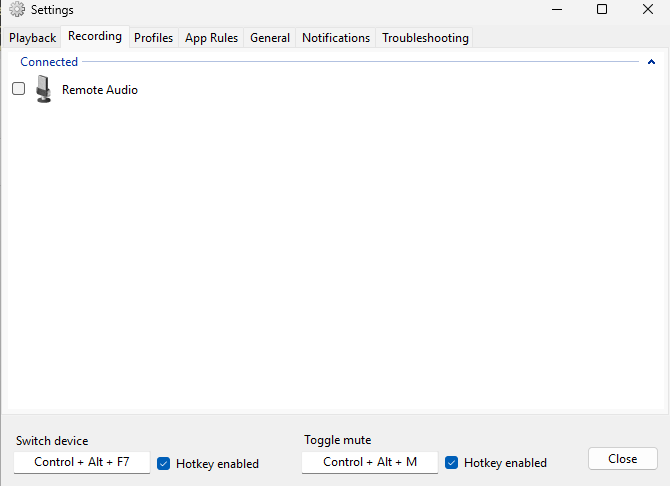
The Recording tab is where you choose which audio input devices (microphones, line-in, etc.) SoundSwitch will cycle through.
Selecting Devices
The main area lists all recording devices detected by Windows, grouped by their connection status:
- Connected — Devices that are currently active and available.
- Disconnected — Devices that are currently unplugged or disabled.
Check the boxes next to the devices you want to include in the rotation. Devices you have checked appear in the Selected group. SoundSwitch will only switch between the checked devices when you use the hotkey.
Hotkey Settings
At the bottom of the tab, you have two independent hotkey controls:
- Switch device — Sets the hotkey for cycling through your selected recording devices (the default is
Ctrl + Alt + F7). - Toggle mute — Sets a separate hotkey to instantly mute or unmute the default communication microphone (the default is
Ctrl + Alt + M). This only affects the default communication device, not every recording device on your system. - Hotkey enabled — Each hotkey has its own checkbox. Check it to activate the shortcut, or uncheck it to disable it.
To set a hotkey, click the corresponding input field and press the desired key combination. SoundSwitch will register the shortcut immediately.